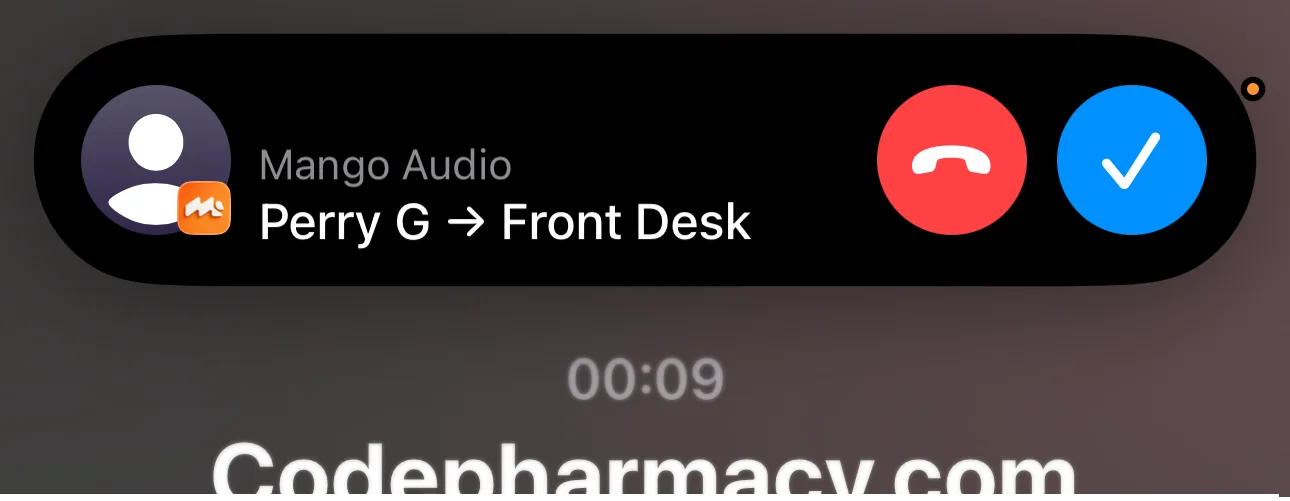
TL;DR: If a call comes through Twilio Studio and Mango does not show the receiving Twilio number, replace Studio’s Connect Call To widget with Add TwiML Redirect. Point the redirect to a TwiML Bin that dials your Mango Client ID and passes
received_on="{{To}}". Mango can then show the called Twilio phone number on the incoming call screen.
The Twilio Studio Receiving Number Problem
Mango can show the Twilio number a customer called, which is useful when your team shares multiple business numbers. For example, you might want the incoming call notification to show whether the caller dialed your sales number, support number, or location-specific number.
This usually works when the call is routed with TwiML that includes call metadata.
The issue appears when your Twilio Studio IVR forwards the call to Mango with the Connect Call To widget. That widget is simple and useful for many call routing flows, but it does not give you a field for custom Twilio Voice SDK Client Parameters. So the call can ring Mango, but the metadata Mango needs to display the receiving Twilio number is missing.
The Fix
Use this Twilio Studio TwiML Redirect path instead:
- Customer calls your Twilio number
- Twilio Studio handles the IVR or routing logic
- Studio reaches the point where it should ring Mango
- Studio uses Add TwiML Redirect
- The TwiML Bin dials your Mango Client ID
- The TwiML Bin passes
received_onwith Twilio’s{{To}}value - Mango receives the call and can show which Twilio number was called
This keeps Twilio Studio for your IVR and routing logic while moving the final Mango handoff into TwiML, where custom Client Parameters are supported.
Create the TwiML Bin for Client Parameters
In Twilio Console, create a new TwiML Bin and use this template:
<?xml version="1.0" encoding="UTF-8"?>
<Response>
  <Dial>
    <Client>
      <Identity>YOUR_MANGO_CLIENT_ID</Identity>
      <Parameter name="received_on" value="{{To}}" />
      <Parameter name="caller" value="{{From}}" />
    </Client>
  </Dial>
</Response>
Replace YOUR_MANGO_CLIENT_ID with the Client ID shown in Mango.
Why {{To}} fixes the called number
{{To}} is the Twilio request value for the number that received the inbound call. When Twilio renders the TwiML Bin, it replaces {{To}} with the actual Twilio phone number. Passing that value as received_on gives Mango the missing receiving-number context.
{{From}} is the caller’s number. Mango already receives caller information in most cases, but passing it as caller makes the handoff explicit and easier to troubleshoot.
Ring Multiple Mango Users
If more than one employee should receive the same call, add multiple Client blocks:
<?xml version="1.0" encoding="UTF-8"?>
<Response>
  <Dial>
    <Client>
      <Identity>EMPLOYEE_1_MANGO_CLIENT_ID</Identity>
      <Parameter name="received_on" value="{{To}}" />
      <Parameter name="caller" value="{{From}}" />
    </Client>
    <Client>
      <Identity>EMPLOYEE_2_MANGO_CLIENT_ID</Identity>
      <Parameter name="received_on" value="{{To}}" />
      <Parameter name="caller" value="{{From}}" />
    </Client>
  </Dial>
</Response>
Use a separate <Identity> value for each Mango user or device that should ring.
Replace Connect Call To with TwiML Redirect
After saving the TwiML Bin, Twilio gives you a URL like this:
https://handler.twilio.com/twiml/EHxxxxxxxxxxxxxxxxxxxxxxxxxxxxxxxxNow update your Studio flow:
- Open the Studio flow that currently forwards calls to Mango
- Find the Connect Call To widget used for the Mango handoff
- Add an Add TwiML Redirect widget in its place
- Paste the TwiML Bin URL into the redirect URL field
- Save and publish the Studio flow
Your IVR, menu choices, business-hour routing, and other Studio widgets can stay the same. Only the final Twilio call routing handoff to Mango needs to change.
Test the Setup
Call your Twilio number from another phone and follow the Studio path that routes to Mango.
Check these results:
- Mango rings for the correct user or users
- The incoming call shows the caller’s number
- The incoming call also shows the Twilio number that received the call
- Studio execution logs show the call reached the TwiML Redirect widget
If the Twilio Studio receiving number still does not show, open the TwiML Bin and verify the parameter name is exactly received_on.
Common Mistakes
Using Studio Liquid syntax inside the TwiML Bin
TwiML Bins use Mustache-style variables for Twilio request parameters. Use:
<Parameter name="received_on" value="{{To}}" />Do not use Studio widget paths like {{widgets.some_widget.value}} unless you are intentionally passing those values into the TwiML Bin URL.
Leaving Connect Call To in the final handoff
The key change is the final Mango handoff. If the call still reaches Mango through Connect Call To, the custom received_on Client Parameter will still be missing.
Using the wrong Client ID
The <Identity> value must match the Mango Client ID for the employee or device that should receive calls. If the identity is wrong, Mango will not ring that user.
Forgetting to publish the Studio flow
Studio changes do not affect live calls until the flow is saved and published. After replacing the widget, publish the flow and test with a real inbound call.
When to Use Twilio Functions Instead
A TwiML Bin is the best option for the common case: pass the receiving Twilio number and ring one or more Mango users without running a server.
Use a Twilio Function instead if you need logic such as:
- Look up the right employee from a database
- Route by location, schedule, or CRM owner
- Generate a dynamic list of Mango Client IDs
- Validate or transform incoming parameters before dialing
For most Mango customers, the TwiML Bin version is faster, simpler, and does not require hosting a server.
FAQ
Does this change SMS routing?
No. This setup affects the voice-call path inside Twilio Studio. Your SMS configuration can continue using the same Mango setup you already have.
Can I keep my existing Studio IVR?
Yes. Keep the IVR and routing widgets. Replace only the final Connect Call To widget that sends the live call to Mango.
What should the parameter be called?
Use received_on. Mango uses that value to show which Twilio phone number received the call.
Can Mango support To or twilio_number too?
The recommended public setup is received_on="{{To}}" because it describes the meaning clearly. Some custom TwiML paths may use other names, but received_on is the cleanest default for Studio-to-Mango calls.
Need Help?
If you want us to confirm your Studio flow, send Mango support:
- A screenshot of the Studio section that routes calls to Mango
- The TwiML Bin XML with Client IDs hidden
- The TwiML Bin URL with the final token partially hidden
- One recent Twilio Call SID from a test call
We can usually confirm the issue quickly from those details.